Unit Groups are used to create groups of units.!
This would normally be used for creating various small groups of attacking enemy units, making the player work hard at creating defenses.
Groups consist of several units belonging to one particular side.
They can either be built - using the resources required to train them, or spawned - just appear taking up no resources.
Using areas you can tell a group to spawn at a particular location on the map. This is great for giving the player extra allied units and make it look as though they have just appeared on the map.! You can also use it to generate lots of enemy units to send to the players base.!
The screenshot below looks a bit daughting, but it is quite straight forward...
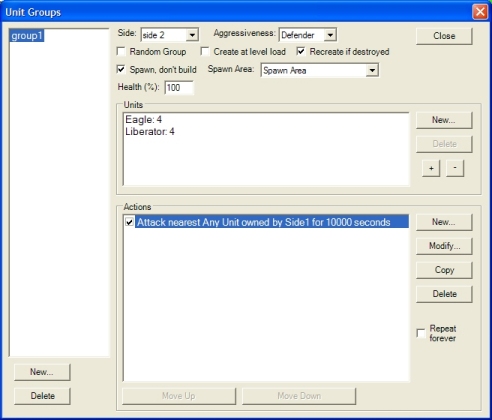
To start, click on the New... button at the bottom left. This will create a new group called group1.
To add units, click on the New... button in the Units section (middle). This is show a list of units, with an amount value at the bottom. Select the unit you want and click OK. You can always increase or decrease this amount using the '+' and '-' buttons.
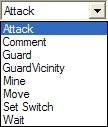
Next, you need to tell the group what it needs to do. Click New... in the Actions section, and pick an action from the list.
Here is more information on unit actions and aggressions
The repeat forever option allows you to tell the created group to just keep performing its action.
As you can see in the screen shot above, we have 8 units listed in this group. 4x Eagles and 4x Liberators. The action these 8 units will perform is to seek out and destroy any unit that belongs to side 1 (the player) for 10000 seconds. Using this number of seconds (about 3 hours) effectively means 'forever'.