In this topic, we'll add a road system, the start of a base, a few allied units.
You will notice on the map screen, there is a bright green line running around the edge. The line marks the boundary of level. Anything placed outside of this boundary will not be accessible to the player.
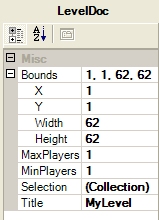
You can change the size of the map and/or boundary by clicking the Settings menu, then the Level option. The right hand section then shows the current settings. Change this to fit your map layout.
The maximum value you can enter for the height and width is 62.
This boundary is important becuase it allows you to have a long or tall map rather than a square.
You can also set the name of your mission here.