Using the replicator professionally in your missions can be quite hard to get right. Shown below is the steps you need inorder to get the replicator and three pads working correctly.
As you can see below, you have a replicator and three pads.
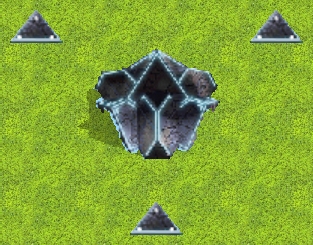
First off, you need to create an area over each of the pads...

Calling them somthing easy to remember.! (ReplPad1, ReplPad2, ReplPad3)
To start with, you need to set the replicator to disabled on the mission startup.
Trigger Settings
[ # ] Sides : Side 1
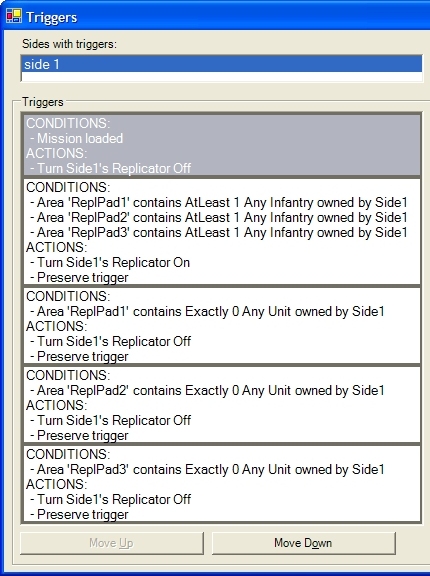
[ # ] Condition : Mission Loaded
[ # ] Action : Turn Side 1's Replicator Off
Next you need to set the conditions for the pads/area. In this case, we want any unit to activate a pad. So we need to set the triggers for each of the areas...
Trigger Settings
[ # ] Sides : Side 1
[ # ] Condition : Area 'ReplPad1' contains AtLeast 1 Any Unit owned by Side1
Now we need to turn the replicator off if any of the areas do not have a unit in them...
Trigger Settings
[ # ] Sides : Side 1
[ # ] Condition : Area 'ReplPad1' contains Exactly 0 Any Unit owned by Side1
[ # ] Action : Turn Side 1's Replicator Off
[ # ] Action : Preserve Trigger
[ # ] Sides : Side 1
[ # ] Condition : Area 'ReplPad2' contains Exactly 0 Any Unit owned by Side1
[ # ] Action : Turn Side 1's Replicator Off
[ # ] Action : Preserve Trigger
[ # ] Sides : Side 1
[ # ] Condition : Area 'ReplPad3' contains Exactly 0 Any Unit owned by Side1
[ # ] Action : Turn Side 1's Replicator Off
[ # ] Action : Preserve Trigger
Once you have finished, you should have something like this...